Dttse is a Dedicated Travel & Tourism Search-engine & E-booking
Hello Guest, you are Welcome.
Home   
 Quick & Easy Search in South Africa
« « « - - narrow your search! - - » » »
 Check-in date      Check-out date  
Sort by:  
Reset  
  • Dedicated Travel & Tourism Search-engine & E-booking
  • Dedicated Travel & Tourism Search-engine & E-booking
  • Dedicated Travel & Tourism Search-engine & E-booking
  • Dedicated Travel & Tourism Search-engine & E-booking
  • Dedicated Travel & Tourism Search-engine & E-booking
  • Dedicated Travel & Tourism Search-engine & E-booking
  • Dedicated Travel & Tourism Search-engine & E-booking
  • Dedicated Travel & Tourism Search-engine & E-booking
  • Dedicated Travel & Tourism Search-engine & E-booking
  • Dedicated Travel & Tourism Search-engine & E-booking
 
Keyword search
Use keywords like name of the establishment, City/Town or date (yyyy-mm-dd)

For a geographical search use Quick & Easy Search, above
Quick Search
box_bg_l.png.
  1. How to "Quick Search" for service/accommodation.
  2. How do I search with keywords?

  1. How to "Quick Search" for service/accommodation.

    Quick Search - Figure

    dttse.com
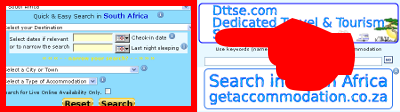
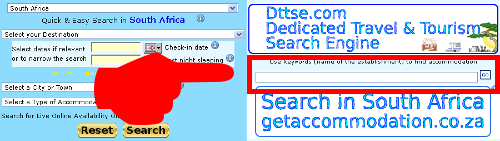
    The "Quick Search" is primarily in the top right corner, pointed out and marked above with a red square.

    Quick Search Figure 1

    dttse.com
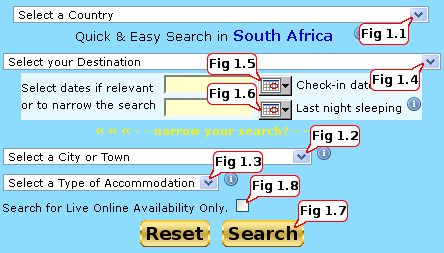
    • Fig 1.1
    dttse.com
    - Points to a drop-down menu for the selection of a country you are searching for. If you know your destination it is the best just to make a selection here combined with dates to find the availability.
      • Note: Selecting a "Select a Country" and then click the "Search" button will return a list of availability listed in the selected country.
      • Using the "Select a Country" option together with other menus or dates will narrow the search. 

    • Fig 1.2
    dttse.com
     - Points to a drop-down menu for the selection of a city or town you are searching for.
      • Note: Selecting a "Select a City or Town" and then click the "Search" button will return a list of availability listed in the selected City or Town.
      • Using the "Select a City or Town" option together with other menus or dates will narrow the search. 

    • Fig 1.3
    dttse.com
    - Points to a drop-down menu for a "type of service" you are searching for.
      • Note: Selecting a "Select a Type of Service/Accommodation" and then click the "Search" button will return a list of availability listed in the selected "Select a type of Service/Accommodation".
      • Using the "Select a Type of Service/Accommodation" option together with other menus or dates will narrow the search.
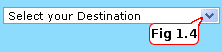
    • Fig 1.4
    dttse.com
     - Points to a drop-down menu for a "Select your Destination" you are searching for. If you know your destination, it is the best to make a selection here with dates to find the availability quick.
      • Note: Selecting a "Select your Destination" and then click the "Search" button will return a list of availability listed in the selected "Select your Destination".
      • Using the "Select your Destination" option together with other menus or dates will narrow the search. 
    • Fig 1.5
    dttse.com
     - Points to a calendar menu, clicking the button will open a calendar for you. Select a check-in date.
      • Note: Selecting a "Check-in date" and then clicking the "Search" button will return a list of availability listed from the date you selected.
      • Using the "Check-in date" option together with other menus or dates will narrow the search.
    • Fig 1.6
     dttse.com
     - Points to a calendar menu, clicking the button will open a calendar for you. Select a "Last night sleeping". 
      • Note: Selecting a "Last night sleeping" date and then click the "Search" button will return a list of availability listed prior to the date you selected.
      • Using the "Last night sleeping" option together with other menus or dates will narrow the search. 
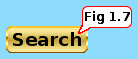
    • Fig 1.7
      dttse.com
    - Points to the "Search" button. 
      • Clicking this button will start a search.
      • Note: To narrow the search criteria make selections from the various drop-down and calendar options.


    [Back To Top]

  2. How do I search with keywords?

    There are two pages where keywords searches can be launched.

    dttse.com

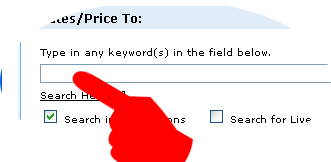
    •  On the home page. The keyword input field is marked in the image above.


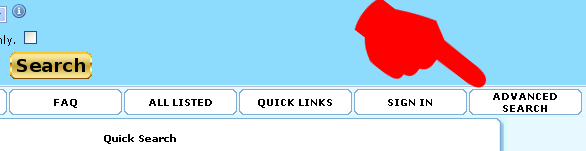
     Or click on the "Advanced Search" button pointed at in the image below.

    dttse.com

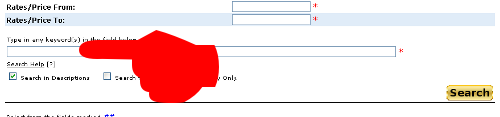
    •  The "Advanced Search" page will open.
    dttse.com

    dttse.com

    •  Follow the instructions on the page and click the "Search" button.


    [Back To Top]

Back
box_bg_r.png.
FAQ
Quick Search
Quick links
Search Results
How to select products/items for a booking
Payment options
Booking Cart
Banner Advertising
Get listed
Send an Enquiry
Your Email Address:

Booking Cart more
0 items
View My Booking Cart History
Upcoming Events
News Flash
Price per day Person/Stand/Unit
Under US$7-87
From US$7-87 to US$10-50
From US$10-50 to US$13-12
From US$13-12 to US$15-75
From US$15-75 to US$18-37
From US$18-37 to US$21-00
From US$21-00 to US$26-25
From US$26-25 to US$28-87
From US$28-87 to US$31-50
From US$31-50 to US$36-75
From US$36-75 to US$42-00
From US$42-00 to US$47-25
From US$47-25 to US$52-50
From US$52-50 to US$78-75
From US$78-75 to US$105-00
From US$105-00 to US$157-50
From US$157-50 to US$210-00
From US$210-00 to US$262-50
From US$262-50 to US$315-00
From US$315-00 to US$367-50
US$367-50 and above

↑ ↑ To the Top ↑ ↑ ↑ ↑ To the Top ↑ ↑ ↑ ↑ To the Top ↑ ↑
Quick Links - Select one and wait for the results
[ Home ][ 0 Items  =  US$0-00  Booking Cart Contents ][ Quick Links ][ Advanced Search ][ My Details ]
[ FAQ ][ Terms and Conditions ][ Data protection ][ Cancellations & Alterations ][ Privacy Notice ][ Copyrights ][ Report a problem ][ Cookie use ]
New Accommodation provider registration
Copyright © 2025 Dttse
This website is proudly powered by Dttse.com (Dedicated Travel & Tourism Search-engine & E-booking)
Wed 10 Dec, 2025
Tourism Service Provider Sign in
Dttse vision is to create an all-inclusive Dedicated Travel & Tourism Search-engine & E-booking
for all types of tourism service providers.
List your service/property.